RingConn Sizing Guide (2026): How to Pick the Right Size
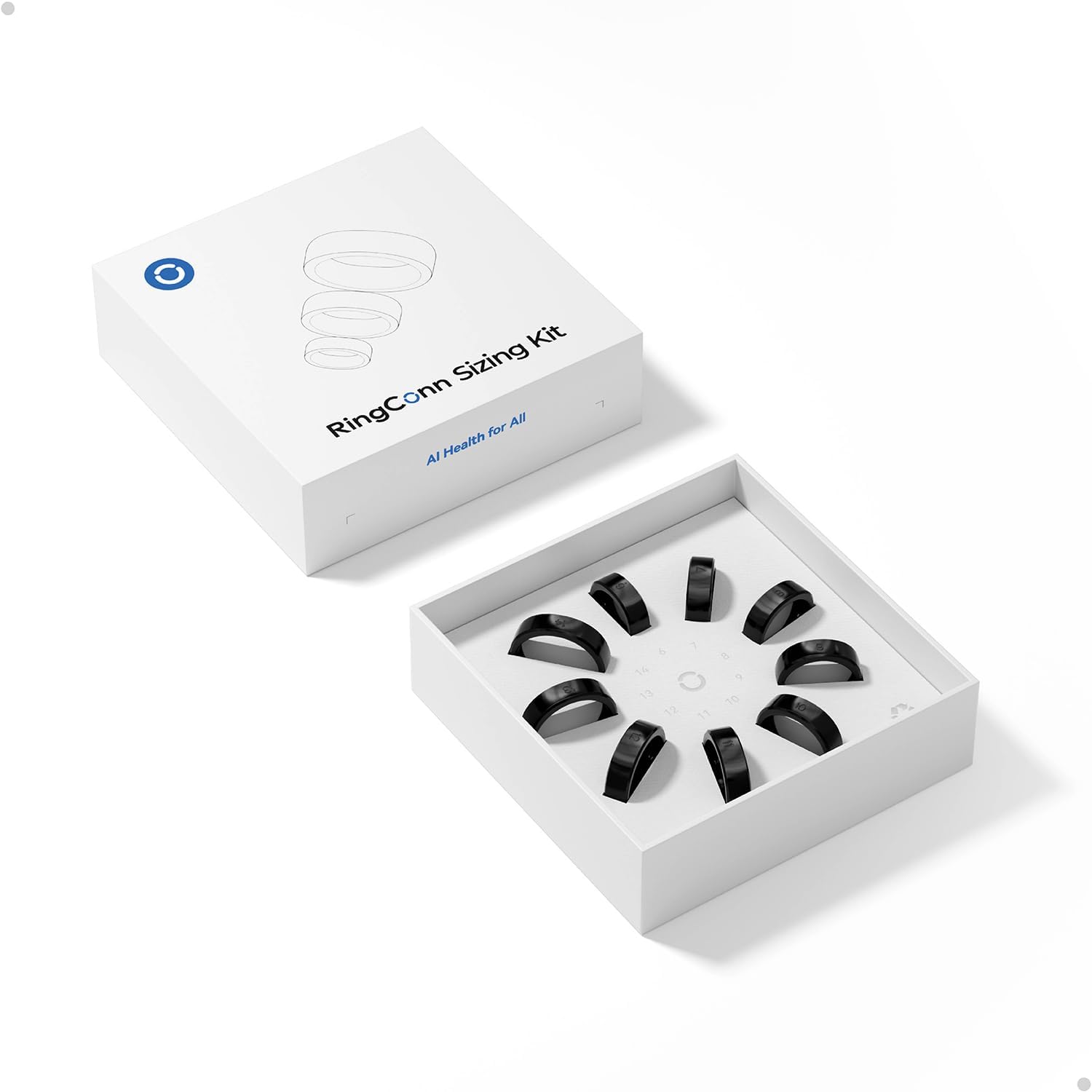
If your RingConn size is wrong, nothing else matters. The ring will rotate, sensor contact will drift, and your data will look random. Most “RingConn is inaccurate” complaints start with fit — we cover this in our accuracy guide.
This guide is written to answer the real search intent behind sizing questions: how to choose a size that stays stable during sleep and daily use.
RingConn sizing system
RingConn Gen 2: Sizes 6-14 RingConn Gen 3: Sizes 6-15 (new sizing system)
Important: Gen 3 uses a different sizing system than Gen 2. Your Gen 2 size does NOT carry over to Gen 3. Always order the free sizing kit for each model. See our Gen 3 sizing guide for the specific differences.
Source: RingConn official sizing guide
What “good fit” actually means
You want stable contact, not “comfort at any cost”.
A good fit usually looks like this:
- You can slide the ring on and off without pain
- It doesn’t spin freely when your hands are dry
- It stays in place when you make a fist
- After a full night of sleep, the ring is in the same orientation (or close)
If the ring rotates a lot at night, expect inconsistent readings.
Why fit affects accuracy: Smart rings use optical sensors (PPG) that need stable skin contact. When the ring rotates:
- The sensor reads different spots on your finger
- Ambient light leaks in through gaps
- Pressure changes, which changes the signal
- Sleep makes it worse because you roll and flex for hours
Fit is not just comfort. Fit is signal quality.
The sizing kit: use it like a test, not a formality
RingConn offers a free sizing kit. Use it properly.
How to use the sizing kit:
-
Wear for 24-48 hours: Don’t just try it for 5 minutes. Wear the sample ring during a normal day.
-
Sleep with it: At least one night. This is when the real ring will be worn most. Nighttime fit is critical.
-
Check morning swelling: Many people are slightly more swollen in the morning. If the sizing ring feels tight in the morning, consider going up one size.
-
Test during normal activity: Wash your hands, do light exercise, type on keyboard. The ring should stay stable.
-
Check rotation: After sleep, check if the ring rotated. If it spun to a different position, it’s too loose.
Which finger is best
RingConn recommends:
- Index finger: Most common, good stability
- Middle finger: Alternative if index doesn’t fit well
Avoid:
- Ring finger: Too much movement during daily activities
- Thumb: Unusual shape, poor sensor contact
The “best finger” is the one that keeps the ring from spinning when you sleep. Test both index and middle finger with the sizing kit.
If you’re between sizes
If one size feels a bit tight and the next feels a bit loose, pick the one that is:
- Stable at night
- Not painful in the morning
Rule of thumb: Slightly snug usually beats slightly loose, because loose equals rotation.
A slightly loose ring causes:
- Inconsistent HRV readings
- Missing sleep data segments
- Erratic readiness scores
A slightly tight ring causes:
- Discomfort during sleep
- Skin irritation
- Finger swelling in hot weather
If you’re truly between sizes, consider:
- Your finger size changes with temperature (cold = smaller, hot = larger)
- Morning swelling makes fingers slightly larger
- Weight fluctuations affect finger size over months
Common sizing mistakes that cause bad tracking
1. Picking a size that feels perfect at 2pm, but rotates at night Finger size changes throughout the day. Test during sleep, not just afternoon.
2. Testing only for 10 minutes, not sleeping with the sizing ring The sizing kit is a test, not a formality. Wear it for at least one full night.
3. Switching fingers every day, then blaming “inconsistency” Each finger has different blood flow and shape. Pick one finger and stick with it for 2+ weeks.
4. Wearing it on a finger that changes size a lot with temperature Some fingers swell more than others. Test in both cold and warm conditions.
5. Using jewelry ring size as reference Smart rings fit differently than jewelry rings. Jewelry rings don’t need sensor contact. Smart rings do.
6. Guessing based on Gen 2 size for Gen 3 Gen 3 uses a new sizing system. Your Gen 2 size won’t transfer. Order the sizing kit.
RingConn Gen 3 sizing differences
Gen 3 has a redesigned internal sensor layout. The ring shape is slightly different, and the sizing calibration was updated.
Key differences:
- Gen 3: Sizes 6-15
- Gen 2: Sizes 6-14
- Sizing systems don’t match
If you’re upgrading from Gen 2 to Gen 3, you MUST order a new sizing kit. Don’t assume your old size works.
See RingConn Gen 3 sizing guide for Gen 3-specific details.
How to order the sizing kit
RingConn offers free sizing kits when you order a ring.
- Go to RingConn official site or Amazon RingConn store
- Add a ring to cart
- The sizing kit is included free
- Wear the sizing rings before finalizing your ring size
Tip: If you’re unsure, order the sizing kit first, then order the ring after testing.
FAQ
Q: Should the RingConn ring leave a mark? A: A light mark can be normal. Pain, numbness, or deep indentation is not. If it hurts, it’s too tight.
Q: Can I wear RingConn on different fingers? A: You can, but don’t switch during your first two weeks. Keep variables stable so you learn what “normal” looks like.
Q: How do I know my RingConn size is wrong? A: If the ring spins easily and you often see it rotated, your size is probably wrong. Rotation causes sensor drift.
Q: Does RingConn Gen 3 use the same sizing as Gen 2? A: No. Gen 3 uses a different sizing system. Your Gen 2 size won’t carry over. Order the free sizing kit.
Q: Which finger is best for RingConn? A: Index or middle finger is recommended. Ring finger has too much movement. Thumb has unusual shape for sensors.